
With Starlink rolling out new packages and subscriptions a few months ago and IridiumGo Exec being available, I’ve started to think about whether or not we should upgrade from Iridium Go for our next crossinf of the Atlantic to the Caribbean this winter. In this article, I share our thoughts on upgrading to one of the new communication solutions.
2023-06-26: After feedback from other sailors, I have corrected some information about mobile antenna and subscription at sea!
Today, there are several different technologies for communicating with others to and from the boat. I think this list is pretty complete for what is commonly used in a normal size sailboat for long distance sailing.
| Technique | Reach (NM) | Area of use | Bring in the life raft | Power W rec/trans | Cost of use |
|---|---|---|---|---|---|
| Vhf | 50 | Speech, AIS, DSC | Yes | 30/70 | No |
| Shortwave radio | 3000 | Speech, data (1) | No | 40/400 | No |
| Smartphone | 20 | Speech, data (2) | Yes | 1/1 | Yes |
| Mobile router | 20 | Data (2) | No | 2/2 | Yes |
| Satellite phone | Global (3) | Speech | Yes | 2/2 | Yes |
| Satelite router | Global (3) | Data | No | 3/3 – 50/150 | Yes |
(2) Can share internet connection with other WiFi capable devices
(3) Different satellite systems have different coverage areas
We have VHF and smartphone on board and we have no thoughts about changes there. We have no thought of getting a shortwave radio because it is a relatively expensive and extensive installation. It does not provide that much bandwidth and requires quite a lot of power when used and provides approximately the same possibility of internet connection as Iridium Go, i.e. download small GRIB-files and receive/send limited e-mail.
Smartphone
In principle, all modern smartphones have a built-in mobile router in that they can share their Internet connection with others (hotspot) via a Wi-Fi network that originates from the phone. Newer smartphones can also have space for two different SIM cards. This means that you can get a SIM card in the country you are visiting and use it in your normal phone while still having the normal SIM card installed.
I think this is a convenient way to have an internet connection with us when we disembark from the boat.
Mobile router
A small low-power gadget with an antenna for connecting to a mobile network. You need to get a SIM card to be able to connect to a mobile network in the country you are in. The mobile router can also be equipped with an external antenna that you can place a few meters up and in this way you get a better range than what you can get with a phone in the boat. Keep in mind that a long antenna cable can attenuate the signal so much that the antenna is of no use. So use an antenna cable with as low so-called attenuation as possible (the lower the attenuation, the more expensive and thicker the cable). Attenuation is measured in decibels per meter (dB/m) of cable. Each antenna connection also results in attenuation of the mobile signal from the antenna. Ideally, the gain in the antenna should be greater than the attenuation in the cable plus connectors. Antenna gain is measured in dB.
Satellite networks
Just as there are several different land-based mobile networks, there are several different satellite based networks for maritime communications. These networks are based on different technologies and standards and cover different large parts of the globe. Each network is operated by an operator. In some cases, there are several different suppliers of communications equipment for use in a satellite network. The equipment always uses the same satellite network. The most common networks for maritime systems are
Inmarsat
A few geostationary satellites (at 35,786 km altitude).
https://www.inmarsat.com/en/about/technology/satellites.html
Globalstar
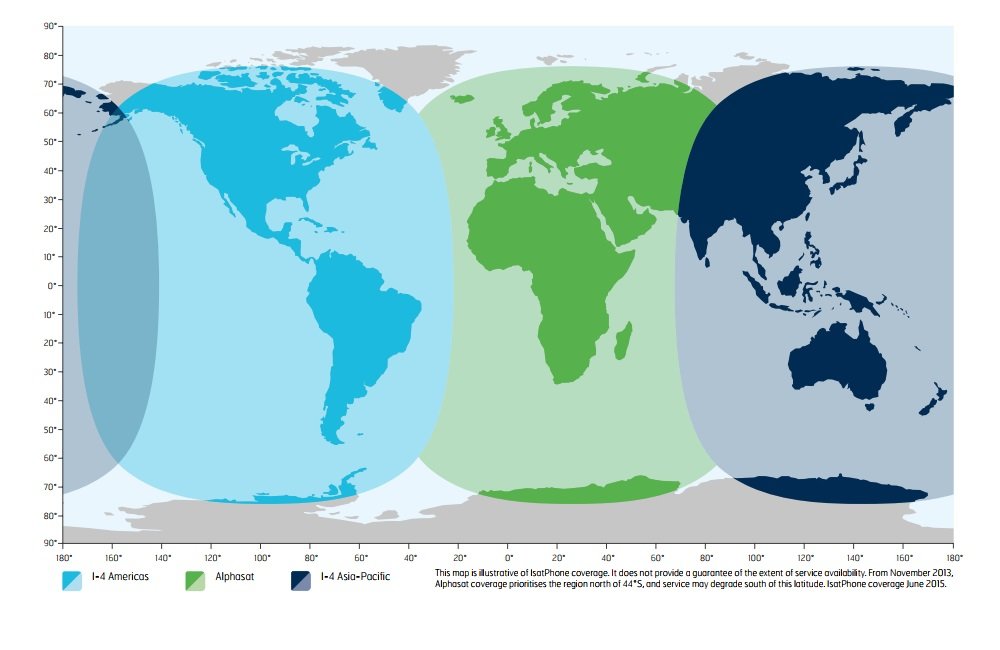
44 satellites in low orbits (approx. 1,410 km altitude) around the earth.
https://www.globalstar.com/en-ap/coverage-maps
Iridium
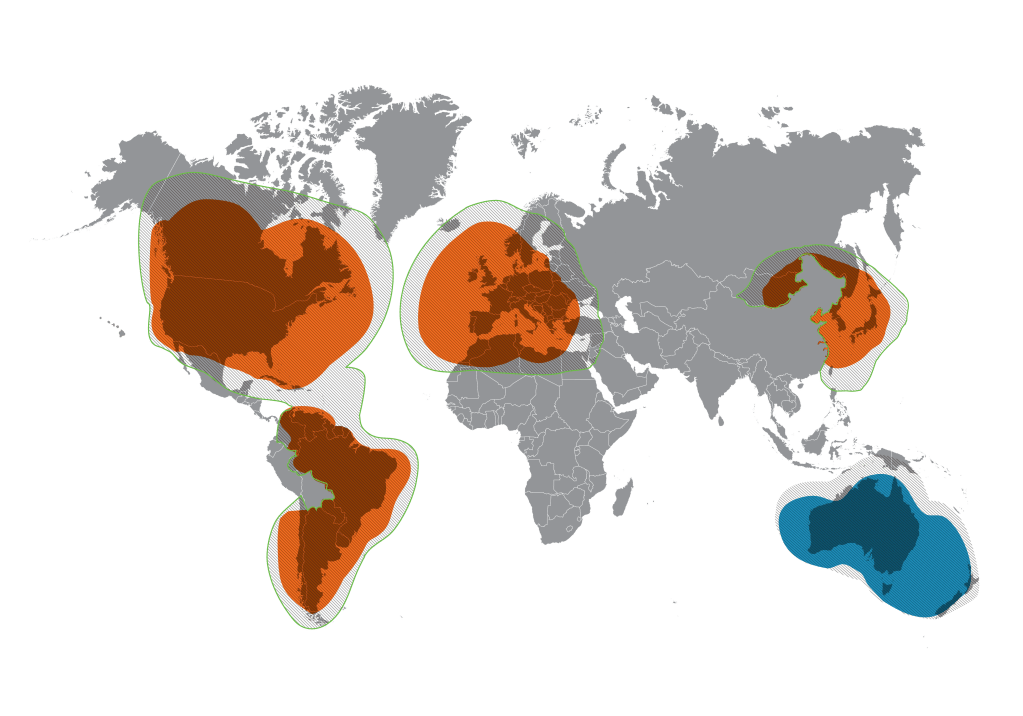
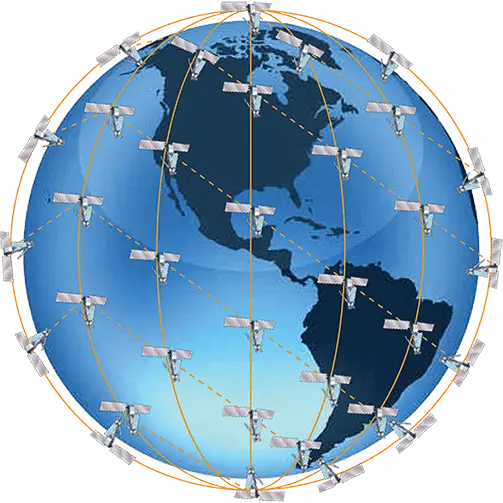
66 satellites in low orbits around the Earth (at an altitude of approx. 780 km).
https://www.iridium.com/network/
Starlink
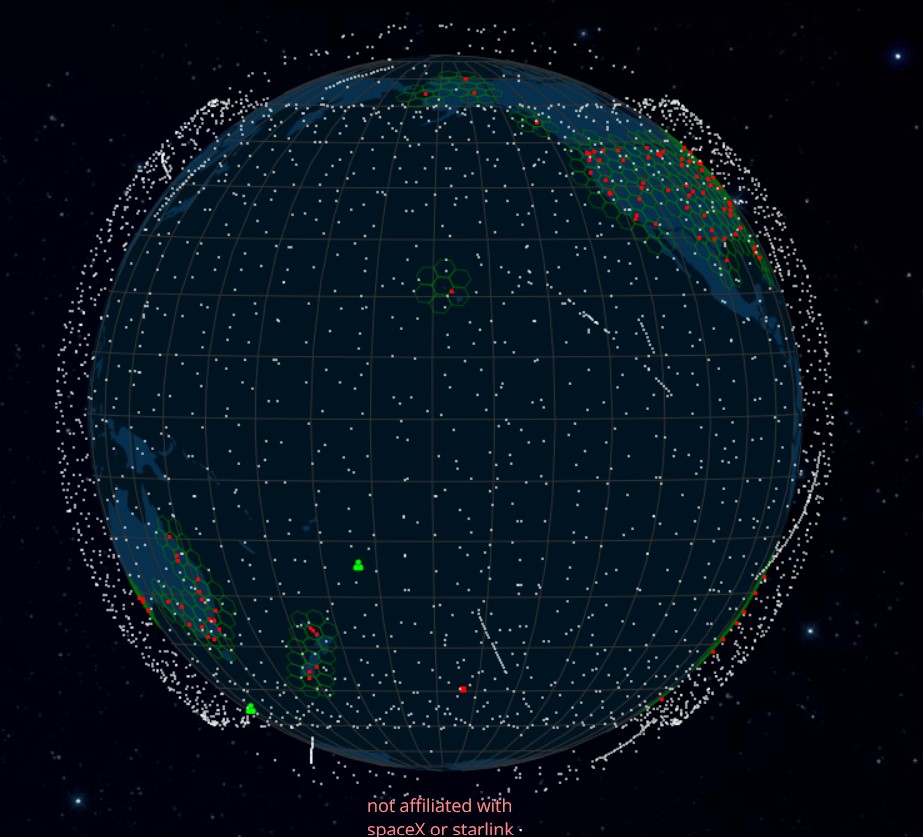
Currently over 4,000 satellites in very low orbits (at approx. 550 km altitude) around the earth. https://satellitemap.space/

Satelitte phone
Basically works like a mobile phone with the difference that it connects to a satellite network that has coverage even far out at sea. A satellite phone is primarily intended for making/receiving calls and SMS. Some satellite phones also have the option of connecting to the internet with low bandwidth and often very limited amount of data.
Often it is the operator of the satellite network that sells the satellite phone to the network. But there are exceptions, eg Garmin, which makes phones and other satellite-based equipment that uses the Iridium network.
Satellite router
A satellite router has the same task as a mobile router, but with the difference that it connects to a satellite network. Often it is the operator of the satellite network that sells the satellite router you need to connect to the satellite network.
In the past, it has been quite expensive to connect to the internet via satellite, preferably if you need a slightly faster connection than the one you get via shortwave radio or Iridium GO. With the launch of Starlink, that has changed radically. Around the same time as Starlink, Iridium has presented Iridium GO Exec, the successor to Iridium GO.
IridiumGo and Iridium GO Exec
We have an Iridium GO that we used on our previous Atlantic sailings and it has enabled us to download the weather forecast twice a day, have a tracking page with short diary entries (text) and the special email box that comes with the subscription to Iridium GO.
Our experience from this use is that it works as long as you limit the size of the GRIB files to a maximum of 100 kB (kByte). There is som bug in the device that force us to restart it 2-3 times per week (remove the battery) because it locks after a period of use. We haven’t had much use for the external antenna because the antenna connector is difficult to connect to the device. We have to disconnect the antenna cable every time we restart it after it locked up, probably the connection has worn out.
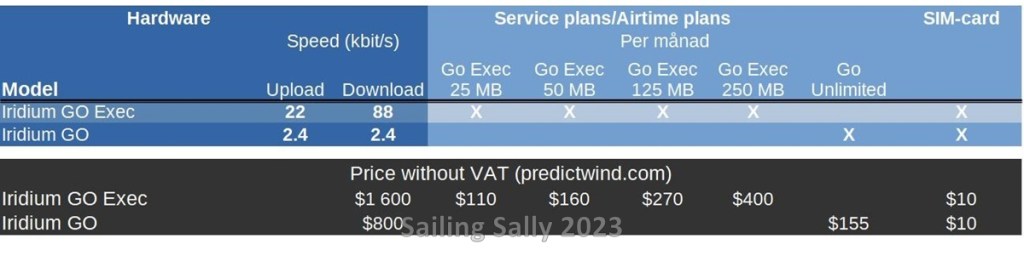
Now the sequel to Iridium GO has been launched, Iridium GO Exec and it could perhaps be a possible candidate to upgrade to.
It is faster than Iridium GO, and would allow you to download slightly larger GRIB files, but it is too slow to use on normal web pages and apps like Facebook and Instagram. It is above all the expensive subscriptions, that make it unusable for anything other than downloading GRIB files, they allow quite a small amount of data per month. The cheapest plan has 25MB, that’s about 1MB per day during a passage and would probably be enough to download the GRIB files I usually download with Iridium GO. The only gain in that case would be that it goes faster! The most expensive subscription provides 250 MB and cost 500 USD a month. By today’s standards, 250 MB is not that much. So for us there will be no Iridium GO Exec on the boat.
Starlink
This satellite network is the newest and started operating a few years ago. The big advantage of Starlink is that it offers global coverage at a relatively low price and high bandwidth. Since the satellites orbit close to the earth’s surface, the communication delay (latency) is lower than in other satellite systems and I think it should be able to work well for e.g. video calls.
As the system is quite new, the service is still being developed and only a few months ago Starlink introduced new packages, subscriptions and prices. With the new packages also came new conditions, e.g. that the terminal is used the right continent, or that you use the right kind of subscription for the use you have. Then the question is how strict they are in controlling these policies.
I’ve read about a few cases where users have been told to stop using the equipment because they don’t have the right subscription. I have yet to see any reports of them using the wrong package (basically the wrong kind of antenna).
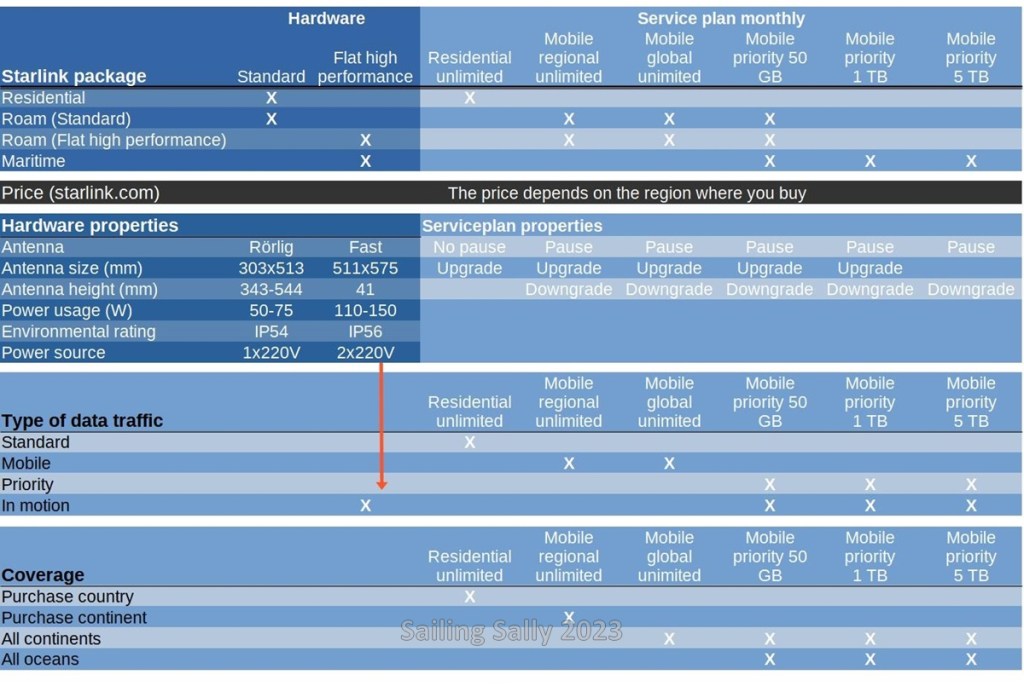
Starlink packages
For using Starlink on a boat, there are three different types of hardware packages you can buy.
Roam with the smaller movable antenna
The antenna targets the strongest radio signal and is intended to be placed on a solid surface, eg a parked car or boat in a guest port. The orientation of the antenna does not change due to the boat pitching or rocking.
Some users have rebuilt the antenna to be able to mount it in a fixed position (to reduce air resistance when mounting on a car). Rebuilding break the warranty.
This package is intended to be used from several locations on/on a continent when the boat is stationary (subscription Mobile regional). With a different subscription (Mobile global) you can use the equipment on other continents than where it was purchased. It is also possible to upgrade to Mobile Priority 50 GB, which is intended for use at sea. When you go out to sea, Starlink turns off the connection to the internet, but you can still access your account and there is the option to turn on Mobile Priority for 2.5 USD per GB and then you get the connection to the internet back.
The packaging is not intended to be used when the boat is sailing or is far out at sea.
Roam with the bigger fixed antenna
The antenna does not need to be aligned, it has a sufficiently large ”field of view” when mounted horizontally and is intended to be placed on a moving vehicle, e.g. a boat or a moving car. The package can be used in the same way as the cheaper Roam. With a special Mobile priority 50GB subscription, it can be used when the boat is sailing close to a continent.
Maritime
Has the same large fixed antenna as in Roam.
It is intended to be placed on a boat. This packaging is intended to be used when the boat is far out at sea and works on all continents. You can only choose the more expensive Mobile priority 50GB, 1TB and 5TB subscriptions with limited data volume.
Description of the service plans
Type of data traffic
Starlink has classified the data traffic into four different classes based on where the terminals are located and whether they are stationary or moving.
- Standard, data traffic to stationary Starlink terminals in the country of purchase
- Mobile, data traffic to mobile Starlink terminals on the purchasing continent
- Global, data traffic to mobile Starlink terminals outside the purchasing continent
- In motion, data traffic to mobile Starlink terminals in motion
Service plans
There are six different types of subscription, three have unlimited data and the other three are intended for use at sea or on the move and have limited with prioritized data. The fact that the data traffic is prioritized means that these subscriptions have priority when there is too much data traffic at the same time.
Unlimited subscriptions
- Residential, intended for use in a fixed location on land in the country where you purchased your Starlink package.
- Mobile regional, intended for use on land in the continent where you purchased your Starlink package. You can upgrade to Mobile Priority traffic, which costs 2.5 USD extra per GB and can be used at sea.
- Mobile global, intended for use on land in continents other than the one where you purchased your Starlink package. You can upgrade to Mobile Priority traffic, which costs 2.5 USD extra per GB and can be used at sea.
Begränsade abonnemang
- Mobile priority 50 GB, intended for use on land and at sea all over the world.
- Mobile priority 1 TB, intended for use on land and at sea all over the world.
- Mobile priority 5 TB, intended for use on land and at sea all over the world.
In the table below, I have made a compilation of the various packages and subscriptions (service plans) that I think are feasible to acquire for a long-sailing boat.
What have we decided?
After considering the various options to connect to the internet from the boat, we have decided to get a Starlink Roam package with the small movable antenna. Choosing the large fixed antenna means that it draws approximately twice as much power and that it is only possible to use the Priority subscription, which costs a bit too much too use all the time.
Some choose to modify the antenna by disconnecting the motors that direct the antenna. I think we will start with that modification so that the antenna works better on a moving boat. There are also those that rebuild the entire backside so that the bar it is mounted on can be removed. Both of these modifications obviously void the warranty, but we take that risk.
At the crossing, we upgrade to a Mobile Priority 50 GB to be able to use the equipment during the entire crossing. On the other side of the Atlantic, we downgrade to a Mobile Global subscription.
For safety, we will also activate our old Iridium GO during the crossing.
Once in the Caribbean, we deactivate Iridium GO and downgrade Starlink to Mobile Global. Another advantage of Starlink is that we do not have to buy SIM cards to be able to connect to the internet when we are in the Caribbean. If we want an internet connection when we are ashore, we can get a local SIM card, but it will not be as important. Hopefully we will also get better access to the internet.
If it is possible to get Starlink equipment when we are in the Caribbean, it is worth getting a new package there and downgrading to Mobile Standard. You earn the extra cost of hardware in 3 months. We’ll see when we get there
 Sailing Sally
Du måste vara inloggad för att kunna skicka en kommentar.